Article · Nov 2025 · 7 min read
Using Docker Compose to Test Go Code with Consul

Using Docker Compose to Test Go Code with Consul
As a platform engineer, I’m always looking for the simplest way to spin up infrastructure for testing and development.
Most days I rely on k3s when I need to simulate production-like environments with multiple services. But for quick, single-service tests, I’ve been reaching for Docker Compose more often because simplicity wins.
Here is my take on when I use each tool:
- *k3s - Best for multi-service testing or simulating production
- *Docker Compose - Ideal for single-service testing with minimal setup
Scenario
I need to test and run my Golang code against the HashiCorp Consul API.
- Using k3s would require:
- Creating a deployment/service/ingress (possibly wrapped in a helm chart)
- Waiting for the full Kubernetes lifecycle
- Using Docker Compose only requires:
- A single YAML file to start Consul locally
- Exposed ports for CLI and SDK access
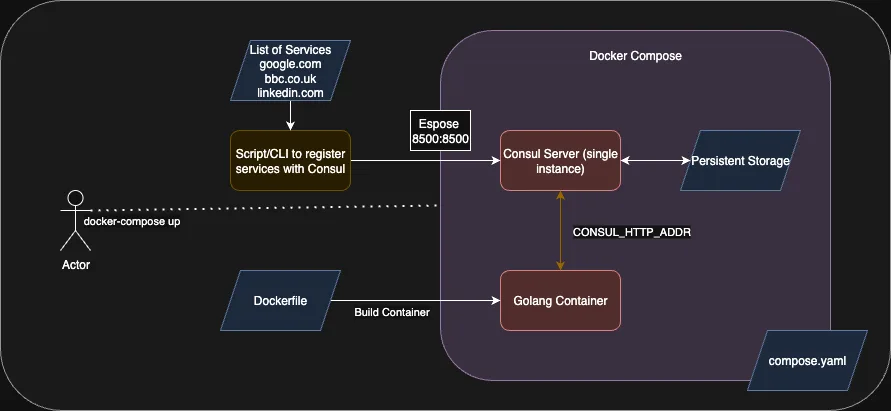 Diagram 1: Example Components using Docker Compose
1. Spinning Up Consul with Docker Compose
Here is a simple docker-compose.yaml that runs a single Consul server with persistent storage:
services:
    consul:
        image: hashicorp/consul:latest
        #command: "agent -dev -node consul-server -client 0.0.0.0 &>/dev/null"
        volumes:
        - consul_data:/consul/data
        ports:
        - 8500:8500
        - 8600:8600/udp
volumes:
    consul_data:
Start Consul:
docker-compose up -d
At this point the Consul Web UI/CLI/API is accessible via: http://localhost:8500
Register some Test Services
With Consul running, register a few fake services:
export CONSUL_HTTP_ADDR=http://127.0.0.1:8500

consul services register -name bbc -address bbc.com
consul services register -name google -address google.com
consul services register -name linkedin -address linkedin.com
Verify services:
export CONSUL_HTTP_ADDR=http://127.0.0.1:8500
curl $CONSUL_HTTP_ADDR/v1/catalog/services
{
    "bbc": [],
    "consul": [],
    "facebook": [],
    "fordyce": [],
    "google": [],
    "twitter": [],
    "yahoo": []
}

# -s silent - don't show progress of the curl
# -X GET - the HTTP Method to use
# jq -r '<query>' - a way to filter the JSON response to get targeted data
curl -s -X GET $CONSUL_HTTP_ADDR/v1/catalog/service/bbc | jq -r '.[].ServiceAddress'
bbc.co.uk
This output verifies that Consul is up and running and that the services have been registered to the catalog.
2. Writing a Simple Go Program to Query Consul
The next step is to connect to Consul and to interact with the catalog using the Golang SDK. This is much simpler than it sounds, don’t worry!
Lets start by creating the project structure which should look like the following once created
myprogram/
myprogram/src/
myprogramsrc/main.go
myprogram/src/go.mod
myprogram/src/go.sum
myprogram/Dockerfile
myprogram/compose.yaml
myprogram/README.md
Create the structure:
mkdir -p myprogram/src/
cd myprogram/src/
touch main.go
go mod init myprogram # You can be as creatinve as you like with your name!
main.go:
package main

import "fmt"

func main() {
	fmt.Printf("hello, lets connect to Consul!\n")
}
Lets check that this works:
go mod tidy
go run main.go
hello, lets connect to Consul!
Taking some inspiration from the examples on the Golang API pages this code can now be expanded to connect to Consul.
The next step will continue to expand on the simple program.
For debugging purposes I will read the environment and print the value for CONSUL_HTTP_ADDR and then also connect to the Consul service.
The Consul SDK will read the environment variables - so I don’t need to do this but it is useful to illustrate how they can be used.
main.go:
package main

import (
    "time"
	"fmt"
	"os"

	capi "github.com/hashicorp/consul/api"
)

func main() {
	consulAddr := os.Getenv("CONSUL_HTTP_ADDR")
	fmt.Printf("hello, lets connect to Consul at '%s'\n", consulAddr)

	client, err := capi.NewClient(capi.DefaultConfig())
	if err != nil {
		panic(err)
	}

	// Start a continuous for loop with a sleep between iterations
	for {
		// similar to the previous curl command to get all services
		// We don't want the meta data that is returned so the middle value is set to `_`
		services, _, err := client.Catalog().Services(nil)

		fmt.Printf("there are %d services registered in Consul\n", len(services))

		// Similar to the jq instruction the results can then be filtered out
		// The svc item is of type map[string][]string
		for svc := range services {
			// Get the service details back from Consul, ton't specify any tags: "" and don't specify any query options: nil
			thisSvc, _, err := client.Catalog().Service(svc, "", nil)
			if err != nil {
			    fmt.Printf("failed to return the service deails for services '%s': %v\n", svc, err)
			    // Sleep for 5 minutes
				time.Sleep(300 * time.Second)
			    continue
			}
			fmt.Printf(" - %s @ %s\n", svc, thisSvc[0].ServiceAddress)
		}
		time.Sleep(60 * time.Second)
	}
}
Run it locally:
go run main.go
hello, lets connect to Consul at 'http://127.0.0.1:8500'
there are 4 services registered in Consul
 - google @ yahoo.com
 - linkedin @ linkedin.com
 - bbc @ bbc.co.uk
 - consul @
Note that consul has included itself in the output and there is no address, for the consul service the ServiceAddress is not populated there is another field - we can decide to omit this or to determine which address field to use if required later on - for now I am happy that the code is now outputting data after connecting to the Consul API using the Golang SDK.
3. Build a Lightweight Docker Image
I like to build my images in phases, so I like to have a build phase and then to switch to a lightweight container image that has very little installed in it to then run the application that has been built
Create a Dockerfile with multi-stage builds:
# Phase 1 - build
FROM golang:1.24.4-alpine AS builder
ENV CGO_ENABLED=0 GOOS=linux
WORKDIR /go/src
COPY src/ ./
RUN go mod download
RUN go build -a -mod readonly -o myprogram \
    -ldflags '-s -w -extldflags "-static"' .
# Phase 2 - run
FROM alpine:latest
COPY --from=builder /go/src/myprogram /usr/local/bin/
CMD ["/usr/local/bin/myprogram"]
What the build flags do:
CGO_ENABLED=0-> build a statically linked binary-s-> remove symbol table (smaller binary)-w-> strip debug info-extldflags "static"-> fully static executable, no runtime library dependencies
Once the program has been compiled and built in the first part, a new layer is created from the latest upstream alpine linux container.
The compiled myprogram is then copied into the new part container layer, the result is a minimal container with only what it needs running inside.
4. Running with Docker Compose
Now we have all the components required to run the program as a simple micro service. Lets extend the compose.yaml to include the Go myprogram:
services:
    consul:
        image: hashicorp/consul:latest
        volumes:
        - consul_data:/consul/data
        ports:
        - 8500:8500
        - 8600:8600/udp
        -
    myprogram:
        build:
            context: .
            dockerfile: Dockerfile
            no_cache: true
        depends_on: consul
        environment:
        - CONSUL_HTTP_ADDR=consul:8500
Restart the stack in the foreground:
docker-compose down
docker-compose up --build
The Consul service will now start and the Go program will connect to Consul and start to list the services and the service addresses associated with them.
Why This Approach Works
- Lightweight - no need for full Kubernetes
- Portable - other contributors can clone the repository and run
docker-compose up - Fast Iteration - Perfect for testing SDK integrations and small experiments
It is important to note how easy it will be to migrate this new service from Docker Compose into Kubernetes as part of a Deployment.
The code used in the example above is available on github
README
Consul & Go Sample with Docker Compose
This sample project demonstrates how to:
- Spin up a local HashiCop Consul instance using Docker Compose.
- Register test services in Consul.
- Query Consul using a Golang SDK microservice running in a container.
- Test integrations quickly without deploying a full Kubernetes cluster.
Perfect for quick SDK testing, learning Consul API usage, and portable demos.
Project Structure
.
├── compose.yaml        # Docker Compose stack for Consul + Go app
├── Dockerfile          # Multi-stage build for Go microservice
├── src/
│   ├── main.go         # Example Go program using Consul API
│   ├── go.mod
│   └── go.sum
├── README.md           # This file
└── docs/diagram.png    # Architecture diagram
Architecture
- Consul container: Single instance with persistent storage
- Go Ccontainer: Connects to Consul using
CONSUL_HTTP_ADDR - Docker Compose: Orchestrates the stack
Prerequisites
- Docker
- Docker Compose
- Go 1.24+ if running outside of the Docker container
Quick Start
- Clone the repository
git clone https://github.com/adamfordyce11/consul-go-sample.git
cd consul-go-sample
- Start Consul Only
docker-compose up -d consul
Access the web UI at: http://localhost:8500
- Register Test Services
export CONSUL_HTTP_ADDR=http://127.0.0.1:8500

consul services register -name bbc -address bbc.co.uk
consul services register -name google -address google.com
consul services register -name linkedin -address linkedin.com
Verify
curl -s $CONSUL_HTTP_ADDR/v1/catalog/services | jq
- Build and run the Go microservice
docker-compose up --build
Expected output in the logs:
hello, lets connect to Consul at 'http://consul:8500'
there are 4 services registered in Consul
 - google @ google.com
 - linkedin @ linkedin.com
 - bbc @ bbc.co.uk
 - consul @
Code Highlights
- Uses HashiCorp Consul API SDK
- Periodically queries Consul catalog and prints registered services.
- Lightweight multi-stage Docker build for a minimal runtime image.
Example loop from main.go:
services, _, err := client.Catalog().Services(nil)
if err != nil {
  panic(err)
}
for svc := range services {
  thisSvc, _, _ := client.Catalog().Service(svc, "", nil)
  fmt.Printf(" - %s @ %s\n", svc, thisScv[0].ServiceAddress)
}
Cleanup
To stop and remove the stack:
docker-compose down -v
Next Steps
- Try and register the servces programatically - adding health checks
- Extend to monitor the service healthchecks
- Port to a Kubernetes deployment